
How to Get Free Gems in Chop A Forest
Find the Daily Reward, complete the Group Reward checks, and see what to do when the 100-gem checklist stays incomplete.
Sources checked October 14, 2026 · Independent guide
Daily Reward: 35 gems
The lobby Daily Reward sign displays +35 gems. VendoPlus describes a six-hour interval; the observed sign shows 5h 41m until the next reward. Follow the live countdown, because the sign is called Daily Reward even though the creator reports a six-hour reset.
- Return to the lobby and find the Rewards stall.
- Read the Daily Reward sign and its current timer.
- Claim when the game marks the reward ready.
- Check the gem balance and next-reward timer after the claim. The available frame shows the timer, not a recorded successful payout.
Source: VendoPlus · gems & perk menu
Group Reward: the displayed 100-gem checklist
The observed panel displays +100 gems. The current Roblox creator name is WCT Capital, while the older in-game reward card says Studio Bricked. Follow the live reward card and the creator/community link on the correct Roblox experience rather than an unrelated group with a similar name.
- Open Group Reward at the lobby Rewards stall.
- Like the game on its Roblox experience page.
- Favourite the game.
- Complete the group membership required by the live panel. The October 13 footage labels this JOIN STUDIO BRICKED.
- Return to the reward panel and check all three boxes before using Done.
- Confirm the gem balance after claiming; a checked box alone does not prove a payout.
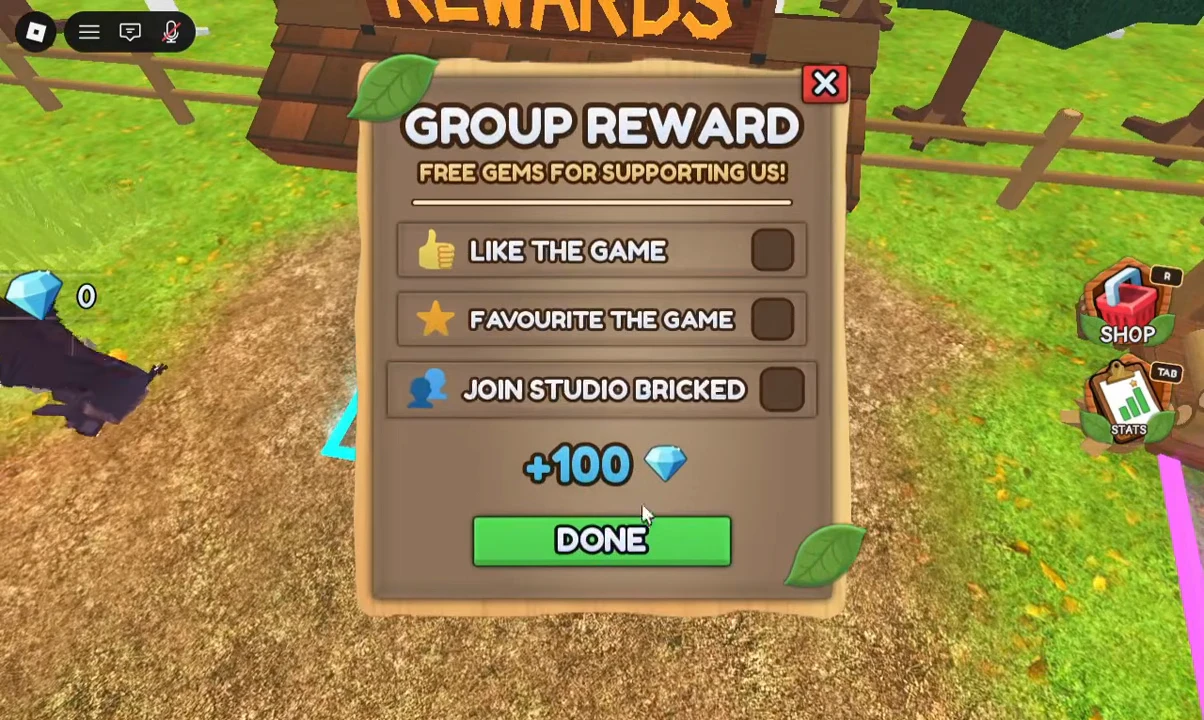
Source: Roblox game & badge records · VendoPlus · gems & perk menu
If Group Reward will not claim
At 1:31 in VendoPlus’s video, Like and Favourite are checked but Join Studio Bricked is blank. It is useful evidence of an incomplete checklist; it is not evidence that a reward was successfully received.
| What the panel shows | Useful check |
|---|---|
| Like or Favourite remains blank | Use the exact game page, then revisit the panel |
| Membership remains blank | Check the group required by the current reward panel and your logged-in Roblox account |
| Some boxes are checked, others are blank | Finish the incomplete condition before expecting 100 gems |
| Done was pressed but balance did not change | Reopen the panel and check eligibility; the researched video did not demonstrate a completed group payout |
Source: VendoPlus · gems & perk menu
What gems can buy
Gems can go toward Gem Perks and the lobby Classes / Garage menus. Gem Perks are labelled Permanent Perks; the tool shop also contains Robux offers with different ownership rules. Compare the perk menu before using your reward gems.
Source: VendoPlus · gems & perk menu · VendoPlus · class menu
These rewards are not redeem codes
Daily Reward and Group Reward are visible lobby reward systems. No confirmed redeem code or code entry screen was established by this research. Use the observed rewards directly instead of assuming a code list unlocks them.
Source: VendoPlus · gems & perk menu · Roblox game & badge records